
Quick answer
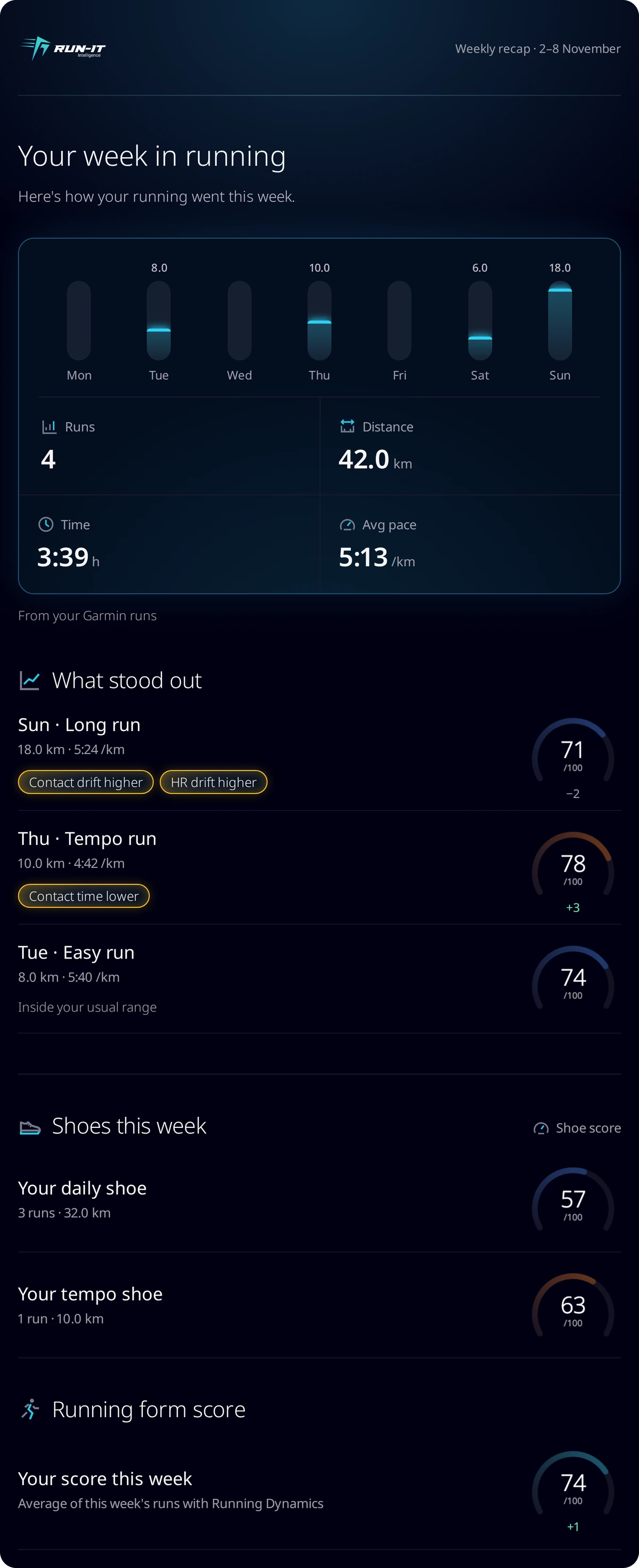
Every Monday, Run-It emails a summary of your last full Monday-to-Sunday week: runs, distance, time and pace, the runs that stood out against your own usual range, the shoes you ran in with their Shoe scores, and your Running form score. It has no ads or offers, and you can turn it off in Settings or with the Unsubscribe link.
The five parts of the email
The chart above lists the five parts of the recap and the limits written into its code. Tap a part to see what it shows. The rest of this page goes through them in the same order, and explains what each number is compared with.
Want one in your inbox next Monday? Sign up and connect your watch.
Which week it covers
The recap is scheduled for Mondays at 07:00 UTC and covers the last full week, Monday to Sunday. It shows runs, distance, time, average pace and a bar for each day you ran, in kilometres or miles to match your account. A small line under the numbers names the source, for example “From your Garmin runs”. If you use more than one device, comparing shoes with Garmin and Stryd data explains how the sources differ.
How “What stood out” works
The section shows at most four runs, and runs with the most tags come first. Each run can carry up to three tags, most unusual first. Run-It checks eleven measurements: pace, cadence, stride, your Loading Pattern Index (LPI), contact time, duty factor, oscillation, vertical ratio, heart rate, contact drift and heart-rate drift.
Each measurement is compared with your own runs: your default comparison set, or your runs in the same shoe once that shoe has at least three. Run-It takes the middle half of those runs and widens it by half its width on each side, without going past your lowest or highest value. A tag appears only when the run lands outside that band.
How one tag is decided
Say the middle half of your comparison runs has a contact time of 240 to 250 ms. That is 10 ms wide, so the band widens by 5 ms on each side, to 235–255 ms. A run at 232 ms gets “Contact time lower”. A run at 248 ms gets no tag for contact time. These numbers are an example.
A tag says how a run differed from your usual, and nothing more. Lower is not automatically better. A shorter contact time can simply come from a faster run, and an unusual run says nothing about injury. If a tag keeps coming back, reading your form data step by step is a good next stop. A run with no tags reads “Inside your usual range”.
Next to each run sits its Running form score, drawn with the same arc as the run page, plus the whole-point change from your usual for that type of run when there is one. How to train your running form explains what you can do with it.
Shoes this week
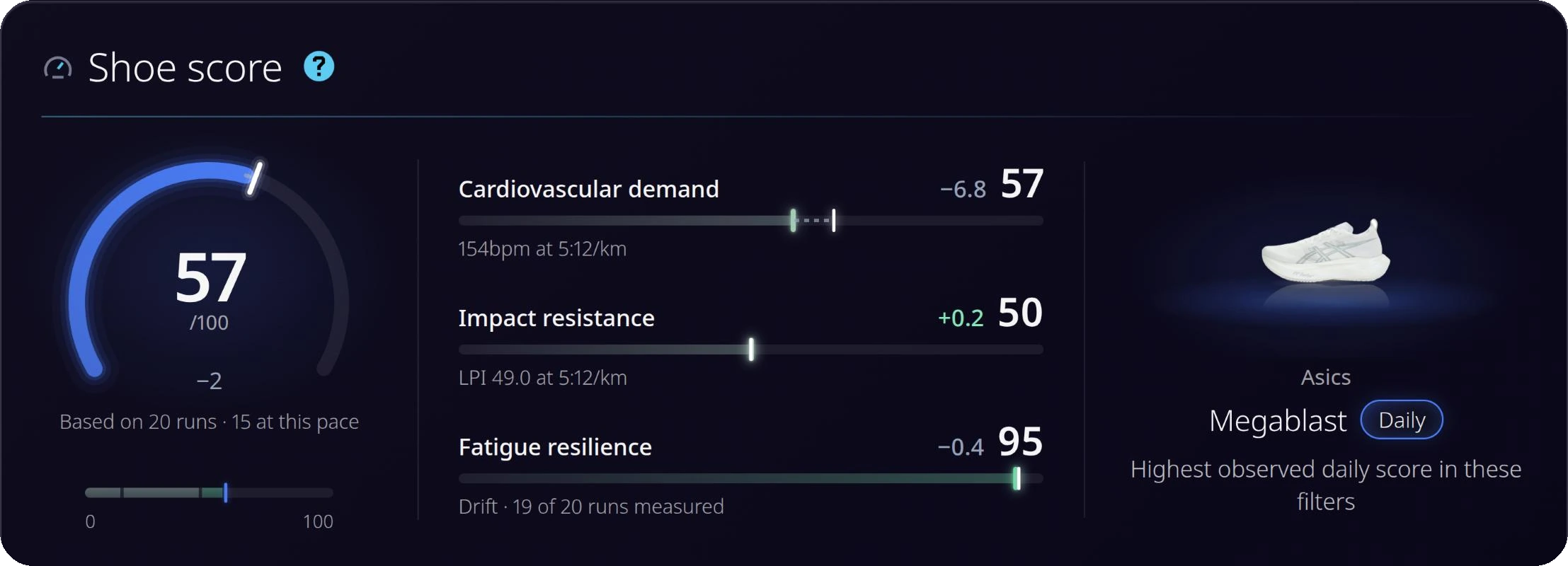
Every shoe you ran in gets a line with its runs and its distance, and the Shoe score for the job that shoe does. That job is your own choice if you set one, then the shoe’s catalogue type, then daily. If it helps you plan, how runners split a shoe rotation shows what the kilometres on each pair can look like.
Runs with no shoe attached get their own line, for example “2 runs this week have no shoe yet. Add one so its kilometres count.” Those kilometres matter when you want to know when to replace a pair.
Running form score
The last block is the rounded average of your runs that have a form score this week, with the change from your usual when there is one. The text under it depends on your source. For Garmin it reads “Average of this week’s runs with Running Dynamics”, and for Stryd “Average of this week’s Stryd runs”.
Why you get one source, and why some runners get none
The email uses the source with the most runs in the five weeks ending with the recap week. A tie goes to the source with the newest run.
Runners whose only source is Strava are skipped, because their runs are not stored.
No runs this week but some in the four weeks before? The heading reads “A quiet week”, and the text says rest is part of training too.
No runs in the week and none in the four weeks before means no email goes out.
How to turn it off
The recap is on by default for confirmed accounts. Switch off Weekly recap email in Settings, or use Unsubscribe at the bottom of any recap, which stops only this email. Settings describes it as “a summary of your runs” with “no ads or offers”. A separate setting covers tips, milestones and a monthly summary when the weekly recap is off. New to Run-It? Start with the running shoe analysis.
FAQ
What does "Contact time lower" mean in my recap?
That run’s ground contact time was below your usual range for the runs it was compared with. It describes a difference from your own runs. It is not a verdict on the run.
Why does a run say "Inside your usual range"?
None of the measurements for that run fell outside your usual range, so there is no tag to show.
Why did I not get a recap?
Runners whose only source is Strava are skipped, because their runs are not stored. No email goes out when you had no runs that week and none in the four weeks before. You also get none if you turned it off.
Why does it only show my Garmin runs when I also use Stryd?
Each email uses one source: the one with the most runs in the five weeks ending with the recap week, then the one with the newest run.
Why does a shoe have no Shoe score in the email?
No Shoe score was available for that shoe’s job. The email then lists its runs and distance only.
Does the recap email contain ads?
No. Settings describes it as a summary of your runs with no ads or offers.